How to restart Charon-VAX/AXP on Linux automatically on failure
- Bruno Miretti (Deactivated)
Table of contents
Description
In case of unrequested Charon virtual machine stop, it is possible, using the systemd features, to restart Charon emulator automatically
Step-by-step guide
Additional considerations
- To perform this procedure, you must have the necessary privileges to handle
systemdservice and executesystemctlcommands - This documentation applies only to Linux distributions including the
systemdfeature. This does not apply to Red Hat Enterprise Linux 6
- Setup your CHARON virtual machine as a service. To do so, refer to the corresponding documentation or install and use the Charon Linux Toolkit.
. Edit the service configuration file and add the following parameters:
Parameter Type Description Restarttext Configures whether the service shall be restarted when the service process exits, is killed, or a timeout is reached RestartSecnumeric Configures the time to sleep before restarting a service (as configured with Restart=). Takes a unit-less value in seconds, or a time span value such as "5min 20s". Defaults to 100ms.StartLimitIntervalnumeric Configure service start rate limiting. By default, services which are started more than 5 times within 10 seconds are not permitted to start any more times until the 10 second interval ends. With these two options, this rate limiting may be modified. Use StartLimitInterval=to configure the checking interval (defaults toDefaultStartLimitInterval=in manager configuration file, set to 0 to disable any kind of rate limiting). UseStartLimitBurst=to configure how many starts per interval are allowed (defaults toDefaultStartLimitBurst=in manager configuration file).StartLimitBurstnumeric  More parameters can be defined for auto-restart. Please refer to your Linux distribution documentation (see How to restart Charon-VAX/AXP on Linux automatically on failure#Links further)
.
Example: The following service will restart in case of failure (Restart=on-failure) after 30 seconds (RestartSec=30) with a limit of 2 (StartLimitBurst=2) within 10 minutes (StartLimitInterval=600)# vim /usr/lib/systemd/system/as4100.service[Unit]Description=DEMO as4100After=atd.service postfix.service ncu.service aksusbd.serviceWants=aksusbd.service[Service]Type=forkingWorkingDirectory=/charon/logExecStart=/opt/charon/bin/as4100 -d /my_services/as4100-service.cfgExecStop=/charon/scripts/mystopscript/my_services/as4100-service.cfgRestart=on-failureRestartSec=30StartLimitInterval=600StartLimitBurst=2[Install]WantedBy=multi-user.target.
Reload systemd manager configuration:
# systemctl daemon-reload
Notes
Autoboot
Restarting Charon emulator does not mean booting the OpenVMS or Tru64 virtual system. You will need to setup the flags at SRM level for autoboot.
See the related documentation of your emulator
Charon-AXP
The default boot device and the action to be performed on boot have to be set
Example for Charon-AXP:
|
Charon-VAX
CHARON-VAX can be configured to automatically boot an operating system at start up.
The MicroVAX 3100, VAX 6310 and VAX 4000 models boot automatically if the correct boot flags are set at the VAX console level:
|
Please check that the TOY, EEPROM and ROM containers (see above) are enabled so the console changes are saved upon reboots.
The ROM of certain VAX models (MicroVAX II, MicroVAX 3600, MicroVAX 3900, VAXserver 3600 and VAXserver 3900) does not allow the SRM console to accept the above command to enable auto booting. As a workaround, a specific setting can be defined in the configuration file:
|
The Charon-VAX 6000 models have a similar configuration setting:
|
Restart limit reached
In case the StartLimitBurst is reached during the interval, you will not be able to restart the service until you reset the failure counter.
Example:
|
Charon Linux Toolkit integration
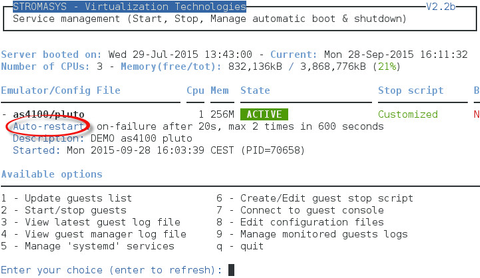
The Charon Linux Toolkit, starting version 41, is able to manage the auto-restart settings.
 Starting with kit version 42, if auto-restart settings are defined they will be displayed in the virtual machines lists while navigating in the menu options and the failure counter will be reset on each start (from the menu)
Example:
Links
Red Hat Enterprise Linux 7 - Managing System Services: https://access.redhat.com/documentation/en-US/Red_Hat_Enterprise_Linux/7/html/System_Administrators_Guide/sect-Managing_Services_with_systemd-Services.html
FreeDesktop.org - systemd.service: http://www.freedesktop.org/software/systemd/man/systemd.service.html
Related articles
© Stromasys, 1999-2024 - All the information is provided on the best effort basis, and might be changed anytime without notice. Information provided does not mean Stromasys commitment to any features described.