Enable/Disable Disk Management Snap-In with Windows GPEDIT.MSC
- dave clements (Unlicensed)
- Bruno Miretti (Deactivated)
- Tony DiFruscia (Unlicensed)
Owned by dave clements (Unlicensed)
Description
Here's how to Disable/Enable the pop-up message that asks to Initialize unformatted disk partitions that we are using for CHARON.
 The down side is, if Disabled, you can't see the LUNs or what state they are in from Windows.
This procedure removes/adds Disk Management as an option in Server Manager/Storage.
Required Windows version: at least Windows 2000
Step-by-step guide
Press the Windows Start menu button and select "Run..." or press the Windows key + R then:
- Run
GPEDIT.MSC - In the User section, open Admin Templates
- Open Windows Components
- Open Microsoft Management Console
Example1: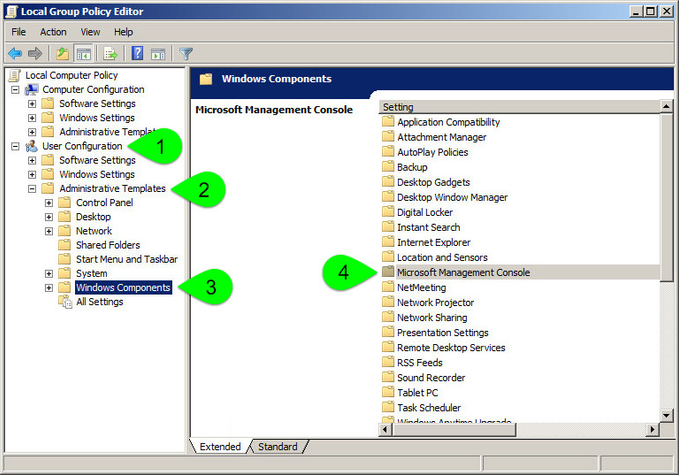
- Open Restricted/Permitted Snap-ins
- Open Disk Management
Example 2: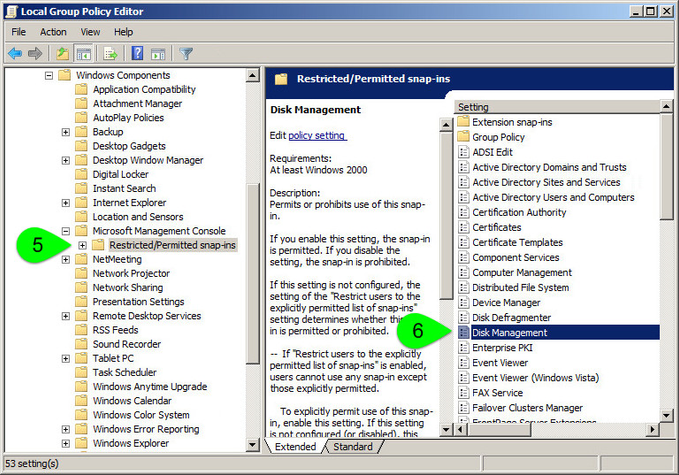
- Check Disable or Enable
Example 3: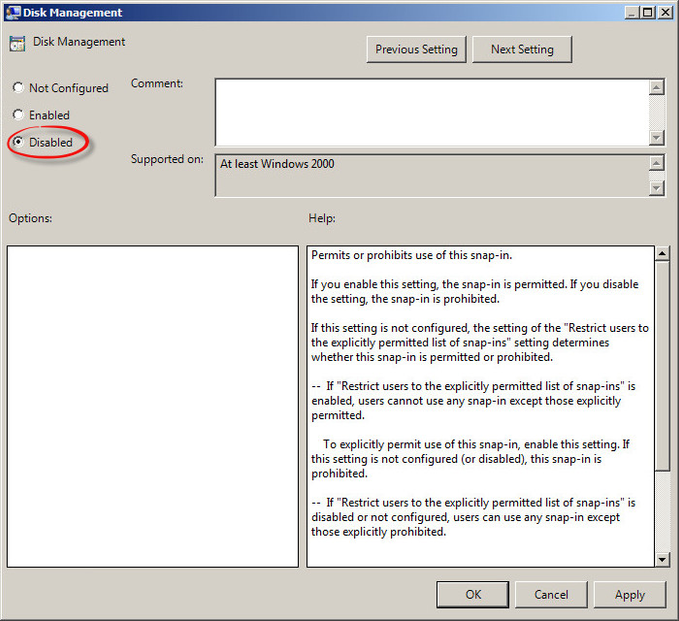
Related articles
© Stromasys, 1999-2024 - All the information is provided on the best effort basis, and might be changed anytime without notice. Information provided does not mean Stromasys commitment to any features described.