How-to install Charon license expiration check on a Linux server
Table of contents
Description
The Charon Linux Toolkit includes a license expiration check utility that can send alert emails, and/or execute a custom script, a specified number of days before the license expires. This document describes how to install the license expiration utility alone, out of the Toolkit so that it can be used on servers running Charon-AXP, Charon-VAX,Charon-SSP or Charon-PAR.
This document relates to license expiration utility version 2.6 dated .
Installation
 All described operations have to be performed on the Charon server and logged in as 'root' (no other user supported).
Prerequisites
Path
Before installing the license expiration check utility, please verify the hasp_srm_view executable path is known.
If Charon-AXP or Charon-VAX is installed, the PATH is already known thanks to the /etc/profile.d/charon.sh file. It usually contains:
|
If Charon-SSP is installed, the PATH is not defined by default. This file must then be created manually with the following lines:
|
If Charon-PAR is installed, the PATH is not defined by default. This file must then be created manually with the following lines (example with Charon-HPA installed in /opt folder):
|
then the following command has to be executed:
|
 This has to be done once. On next login, the file will be automatically executed and the path correctly set.
 To verify the path to
 hasp_srm_view is known, use the following command:
|
If a file name is not returned with its full path:
- check the
$PATHvalue contains the path to thehasp_srm_viewexecutable file (this can be done by running "echo $PATH") or - execute the
charon.shfile as mentioned above.
Mail Transport Agent
The Mail service must have been configured. The Mail transfer agent can be postfix, sendmail, ...
Download
To download the utility, you must issue a request via email to the Stromasys support team (support@stromasys.com) or ask your reseller.
Setup
The utility is provided in a tar file that must be extracted into the /opt/charon/utils folder. If this folder does not exist, you can create it this way then copy the tar file to this folder:
|
Extract the files from the tar file to the Charon installation directory, subdirectory ‘utils’:
|
Execute the installation script:
|
The setup script will:
- Verify the required packages are installed (at, bc, lsusb, ...),
- Create the crontab file and/or add the necessary entries: by default the expiration check is scheduled at 1 AM and 9 AM each day and will send an alert 15 days before expiration,
- Ask to fill the recipients list in case an alert has to be sent,
- Ask for the email mode, text or html (default),
- Ask if a test email has to be sent,
- Will display information on how to check the script is working correctly and how to force an alert
Optional setup
It is possible to:
- Add a footer to the email body when an alert is sent by adding any information you need in the
/etc/charon.d/CharonToolkit_check.mailfooterfile (one line or more), - Change the name of the email sender (name only, not email address) by adding a single line containing the name of the sender in the
/etc/charon.d/CharonToolkit_check.mailfromfile - Create a custom script in
/opt/charon/utilsfolder, namedcharon_expchk.customto send alerts to a monitoring utility- It needs to be set to executable (
chmod u+x ...). - If this script is defined, it is recommended to add the "
-nomail" parameter to the script execution in the crontab file to avoid sending a custom alert and the email at the same time - Parameter 1 passed to this script is the alert level. Possible values, case sensitive, are: Informational, Minor, MAJOR, CRITICAL and EXPIRED
- Parameter 2 passed to this script is a description of the alert containing the expiration date, license number and product afffected
- It needs to be set to executable (
#!/bin/sh
#-----------------------------------------------------------------------
# charon_expchk.custom
#-----------------------------------------------------------------------
ZABSEND=/usr/bin/zabbix_sender
ZABCONF=/etc/zabbix/zabbix_agentd.conf

if test -x ${ZABSEND}
then
  if test -s ${ZABCONF}
  then
    case "$1"
    in
      Informational)   LVL="INFORMATION";;
      Minor)           LVL="WARNING";;
      MAJOR)           LVL="AVERAGE";;
      CRITICAL)        LVL="HIGH";;
      EXPIRED)         LVL="DISASTER";;
      *)               LVL="NEUTRAL";;
    esac
    ${ZABSEND} -c ${ZABCONF} -k charon_expchk -o "${LVL};$2" >/dev/null
  else
    echo "The Zabbix agent configuration file is missing. Cannot send alert!"
  fi
fi
root's crontab update example:
0 1 * * * /opt/charon/utils/charon_expchk 15 -nomail |
Examples
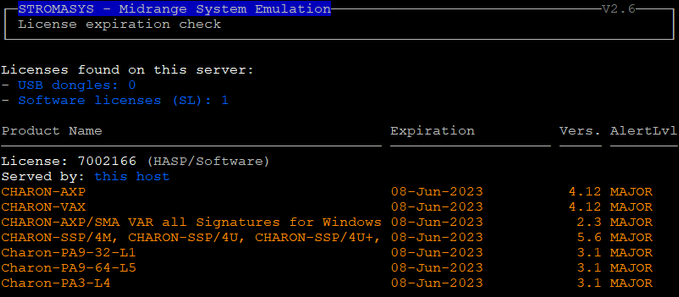
Interactive session with license expiring soon:
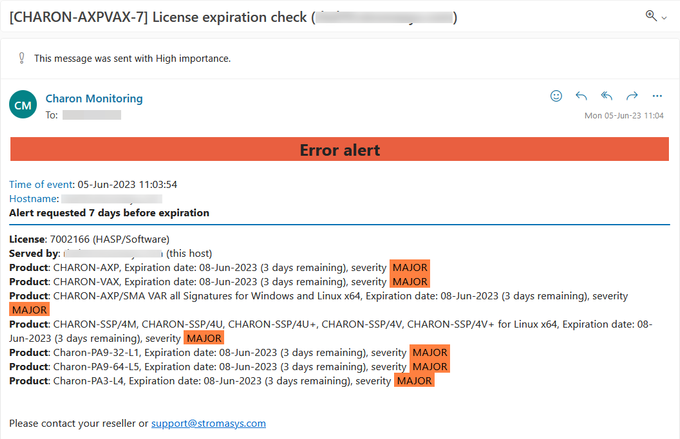
Alert email:
Additional parameters
- Number of days before the license expires that will generate an alert → specify a number of days (default = 7)
- Prevent from sending default email →
-nomail. This option is useful when a custom script is created to send alerts - Force the expiration date for sending an alert/debugging →
-expdat=<DD-MMM-YYYY>where DD = day of the month, MMM = month (3 characters, 1st letter uppercase), YYYY = year ( format of the date must be respected)
Example:
# /opt/charon/utils/charon_expchk 15 -nomail -expdat=08-Jun-2023 |
Related articles
© Stromasys, 1999-2024 - All the information is provided on the best effort basis, and might be changed anytime without notice. Information provided does not mean Stromasys commitment to any features described.