License expiration check
- Bruno Miretti (Deactivated)
Introduction
Once setup, this utility will execute once a day at 09:00 AM and will send Windows Application Events 15 days before expiration. No other action will be taken unless you customize the expiredlicense.bat script. The utility can be found in the Charon installation folder under the "Redistributables\Stromasys" child folder.
 The license expiration check utility is not provided with the CHARON-AXP V4.11 kit. If you need it, please ask us for the download link.
The installation process is described below. It is recommended not to update the example files given with the kit as they could be overwritten by a patch installation or product upgrade. It is preferable to copy them in a dedicated folder.
Version: 1.18 - Published:
Table of contents
Description
The goal of this Powershell script is to read the license content and send alerts 15 days (by default) before expiration. This document is related to the kit versions 1.9 to 1.17.
This utility is replaced by CHARON on Windows - Charon License Utility that provides a graphical interface providing the Windows server has PowerShell 5.1 and .NET Framework 4.6 minimum installed (4.8 recommended) installed.
Alerts consist in:
- Adding a Windows Event entry in the Application log
- Executing a customized script named "
expiredlicense.bat" that can execute actions at your convenience: send an email, send an event to a monitoring software, etc...
Alert levels:
| Days before expiration (date limited license) | Hours before expiration (time limited license) | Alert level |
|---|---|---|
| Between 7 and number of days defined (15 by default) | Between 73 and 96 hours | Informational |
| Between 3 and 7 | Between 49 and 72 hours | Warning |
| Less than 3 and expired | Less than 49 and expired | Error |
Related products:
Charon-AXP and Charon-VAX/PDP V4.5 and above
Operating systems:
Windows 7, Windows 8.1, Windows 10 Professional, Windows Server 2008 R2, Windows Server 2012 (R2), Windows Server 2016, Windows Server 2019
Step-by-step guide
Installation
- Create a folder dedicated to store the scripts, for example: "
C:\Charon" - Download the kit from our SFTP server (please ask us connection credentials if you have no access) and extract all files in this folder. The kit contains some files, their usage is described further in this document.
. Optionally create the "
expiredlicense.bat" file in the same folder and customize it at your own (to send emails for example). If the script does not exist, a warning event will be posted but it will not prevent the script from running. In this case only Windows Application events will be sent.
.
Below is a simple example to append entries in a log file. You will find further in this article an example on how to send an email using powershell.echo %date% %time% %1 %2 >> C:\Charon\expiredlicense.logNotes:
- "
%1" corresponds to the severity level and can be "informational", "warning" or "error" - "
%2" corresponds to the alert message containing the license number, the product name and the expiration status
- "
Interactive check
- Open a command line window
- Move to the folder you created, example:
C:\Charon - Execute the powershell script. The following parameters can be passed to the script:
- "
-folder" is used to specify where the scripts (.ps1 and .bat) are stored. If not specified, default is "C:\Charon" - "
-nbdays" is used to specify the number of days before expiration to start sending alerts, default is 15 - "
-nbhours" is used to specify the number of hours before expiration of a backup/spare license (time limited) to start sending alerts, default is 96. Must not be lower than 72. - "
-usevanilla" is used in case thehasp_view.exeprogram is not able to provide the expiration date in the output file (bug found in builds 18304 and 18305 withhasp_view.exeversion 1.26). In this case, the script will use thehasp_view.exeprogram located in the "xxxxx_ORIGINALS_xxx_PATCH_xxx" folder (example:B18302_ORIGINALS_AXP_PATCH_X64). The bug is solved withhasp_view.exeversion 1.27 and later. - "
-haspview <hasp_view.exe location>" is used to specify the location of thehasp_view.exefile. If this parameter is not specified then the script searches for the location itself depending on Charon installation folder. It is used in case a license server performs the checks instead of the server hosting the Charon virtual machines. The "-usevanilla" parameter is ignored if this parameter is defined. - "
-ini <file>" is used to specify a file where the-folder,-nbdays,-nbhours,-usevanilla,-haspviewand-tickparameters can be stored. Priority goes to the parameters passed in the command line then those in the specified file. The file is used to facilitate updates in the parameters passed in the tasks scheduler (update the file instead of the task). "-tick"parameter is used to execute external script (expiredlicense.bat) even if no alert is detected (counter alert for monitoring software). If used in the .ini file, "1", "y", "yes" or "true" value activates it, other values will invalidate (Example:tick=true)
- "
To run PowerShell scripts (files that end with .ps1), you must first set the execution policy to Unrestricted (This operation has to be done once).
To do so, open a command line window (cmd.exe) as an Administrator and use the following command:c:\Charon>powershell -command "Set-ExecutionPolicy Unrestricted"
The ExecutionPolicy can also be set to "RemoteSigned". In this case the .ps1 script files will have to be unblocked as described below.
If you are still prompted to allow for execution of the script, please run the following command to unblock the downloaded charon_expchk.ps1 file:c:\Charon>powershell -command "Unblock-File -path c:\charon\charon_expchk.ps1"
Example:
c:\Charon>powershell -file charon_expchk.ps1 -folder c:\charon -nbdays 20 |
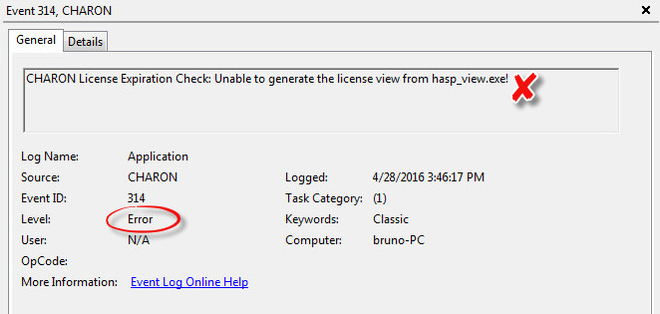
If the license is not readable (dongle not connected for example), the script will end with an "Unable to generate the license view from hasp_view.exe!" error, an entry will be added to the Windows Event Application log and the expiredlicense.bat script will be executed.
If no script error is detected, it is now possible to create a new scheduled task.
Scheduled task creation
Scheduled task creation using the Graphical User Interface
To set this,
- either open the Administrative tools under Control Panel and select "Task Scheduler" or
- execute
taskschd.mscfrom the Windows run command (press Windows key + R)
Examples are given based on a Windows 2008 R2 server
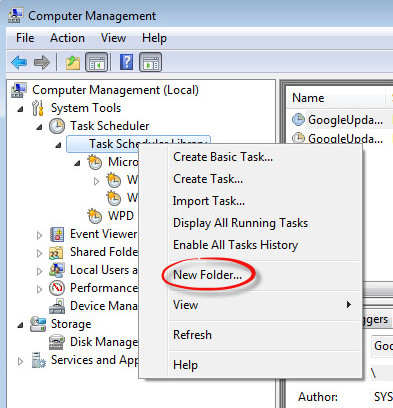
Right click on Task Scheduler Library, select New folder then enter CHARON.
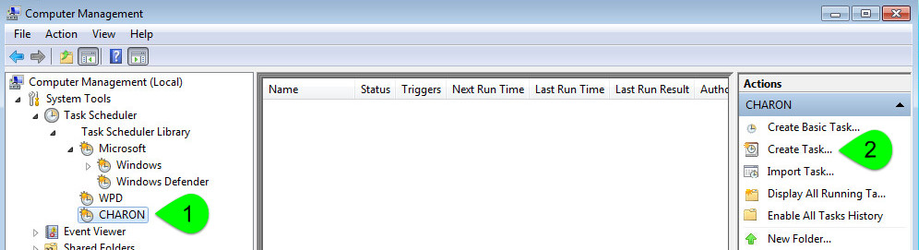
Select the newly created folder (1) and on the right pane, select "Create Task..." (2).
 Do not use "Create Basic Task..." some of the options required aren't available in that wizard.
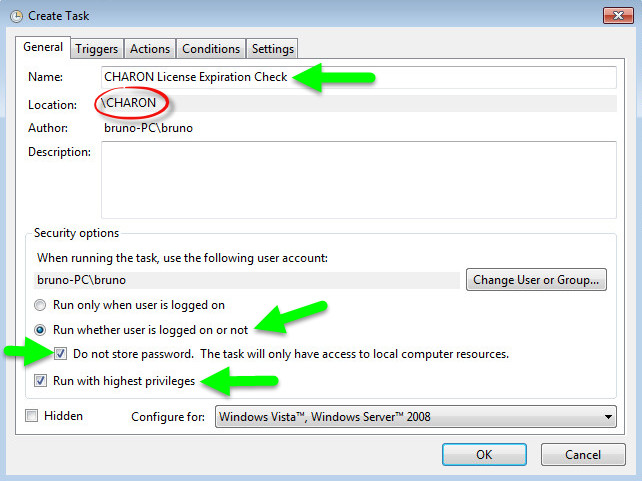
Fill the General tab as below:
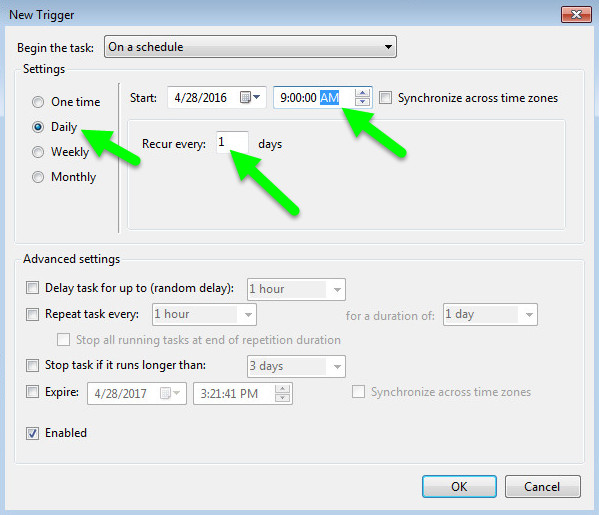
Select the Triggers tab and set the check interval, for example here: everyday at 09:00 AM
Select the Actions tab and configure powershell to be executed with the following parameters:
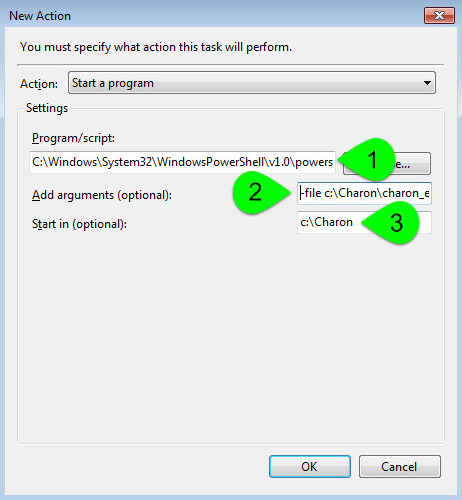
(1) : Powershell location here is "C:\Windows\System32\WindowsPowerShell\v1.0\powershell.exe"
(2) : Define the powershell arguments to be added: -file c:\Charon\charon_expchk.ps1 -folder c:\Charon (the folder parameter is optional here as it is the same as the default folder)
(3) : Set the folder to be the one where the scripts reside
Once the task is created, it is recommended to right click on the task then "Run". To verify the script ran correctly, please check the existence of the "charon_expchk.txt" file in the installation folder (it should contain the license view, if the license is present) and check for events in the Windows Event Application log if any.
Scheduled task creation using the Character User Interface
Open a command line window (cmd.exe) and execute the following command:
/TR "C:\Windows\System32\WindowsPowerShell\v1.0\powershell.exe -file c:\Charon\charon_expchk.ps1 -folder c:\Charon"
|
 Update the schedule type (/SC) and time (/ST) to your desired settings
Start the task as shown below:
schtasks /run /TN "CHARON\CHARON License Expiration Check" |
To verify the script ran correctly, please check the existence of the "charon_expchk.txt" file in the installation folder (it should contain the license view, if the license is present) and check for events in the Windows Event Application log if any.
Configuration file example
In the following example, the parameters/values are stored in the c:\charon\charon_expchk.ini file.
Example:
|
To execute the script with the .ini file, use the following command:
c:\Charon>powershell -file -ini c:\charon\charon_expchk.ini |
To create the scheduled task, open a command line window (cmd.exe) and execute the following command:
TR "C:\Windows\System32\WindowsPowerShell\v1.0\powershell.exe -file c:\Charon\charon_expchk.ps1 -ini c:\Charon\charon_expchk.ini"
|
Hints
To verify the script is correctly working and to force the creation of a Windows event, and eventually the execution of the "expiredlicense.bat" file, you can:
- either play with the removal of the dongle (if there is, that is no Software License)
- or with the number of days (if the license is not unlimited)
- or you can specify a folder that does not exist.
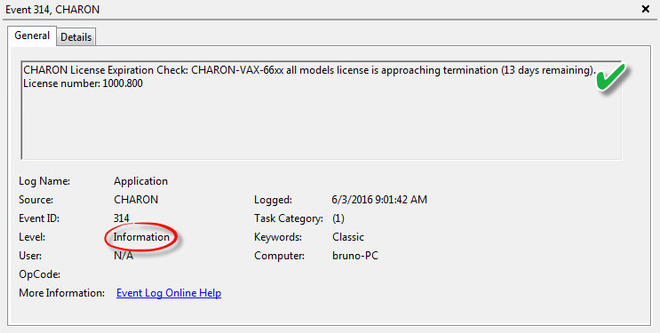
Windows Event Application log example - Information alert:
Windows Event Application log example - License dongle not connected:
Sending alerts via email - example
Using Powershell we can send alerts via email. You will find below an example with configuration steps.
Configuration details:
- Windows 2008 R2 server
- Powershell V4.0 installed.
- This version is required to have the "
-port" option available from the "send-mailmessage" powershell command. To determine which version of Powershell is installed and upgrade if necessary, see Powershell version, upgrade, enabling scripts execution, tips and tricks
- Email account hosted on Office365
Email account password encryption
Due to the email account settings, to be able to send an email we need to generate a CliXML file that will store the encrypted password as described below.
This file will only be valid for the current user and machine. The following operations must be performed using the same user as the author of the scheduled task.
The "<monitoring-account>@<somewhere>" value must be adapted to your configuration
When you will execute the "get-credential" command, you will be prompted to store the password of the corresponding email account, that is the "sender".
|
If the sender's email address or its password has to be changed, the .clixml file will have to be recreated.
Powershell script used to send emails
Create a Powershell script named "sendmail.ps1" in the "c:\Charon" folder for example.
The sender ($From) and recipient ($To) values must be adapted to your configuration
Param(
  [string]$lvl = "Information",
  [string]$msg = "no message"
)

$Hostname = (Get-Item env:\COMPUTERNAME).value
$Creds = Import-clixml C:\Charon\creds.clixml

#--- Customize the values below: "From" and "To" -----------------------------
$From = "<monitoring-account>@<somewhere>"
$To = "<someone>@<somewhere>"
#-----------------------------------------------------------------------------

send-mailmessage -to $To -from $From -subject "CHARON License Expiration Check for $Hostname ($lvl)" -body "$msg" -credential $Creds -smtpserver smtp.office365.com -usessl -port 587 -delivery none
If you have to specify multiple recipients, an array has to be used as described below.
Example1:
$To = @( "James T. Kirk <kirk@uss-enterprise.fed>", "Spock <spock@uss-enterprise.fed>" )
Example2:
$To = @( "kirk@uss-enterprise.fed", "spock@uss-enterprise.fed", "uhura@uss-enterprise.fed" )
The example shown above and another one given with embedded html code and colored email body are part of the kit downloaded previously.
Office365 email account is given here as an example but you can use "gmail" also and create a free dedicated account to send alerts. In this case the last line of the script(s) above has to be updated: the "-smtpserver" parameter has its "smtp.office365.com" value to be replaced by "smtp.gmail.com" (no other value to update)
Google may block sign-in attempts when using powershell and send-mailmessage. In this case the sender will receive a "Sign in attempt prevented" alert email. To allow emails to be sent:
- Create a dedicated gmail account
Allow less secure apps to access your account. See this article: https://support.google.com/accounts/answer/6010255?hl=en
expiredlicense.bat file settings
Add the following line in the "expiredlicense.bat" file:
|
This .bat file can be found in the kit downloaded previously.
Scheduled task settings update
This time, the General tab of the Scheduled task has to be updated in order to store the password and to be able to send the email:
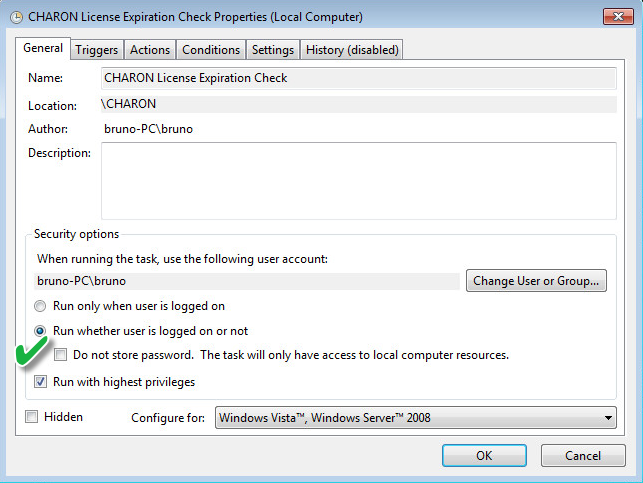
You will be prompted to store the password of the author.
This can also be done using the command line:
schtasks /change /TN "CHARON\CHARON License Expiration Check" /rp <password> |
Related articles
© Stromasys, 1999-2024 - All the information is provided on the best effort basis, and might be changed anytime without notice. Information provided does not mean Stromasys commitment to any features described.