VM management - Create/Edit guest stop script
- Copy Page Tree
- W.Erber
- Bruno Miretti (Deactivated)
Table of Contents
Description
Use this option to edit the stop script that will be executed at service shutdown upon manual request or during the Charon Linux server shutdown procedure.
The script is unique and uses the configuration file (full name) to select commands to be executed at guest shutdown (selected by "case in...").
If the script does not exist, it will be generated automatically based on existing guests list and will by default do nothing except preparing the script skeleton with commands using the provided script examples to perform the shutdown via either "expect", "rsh" or "ssh". Newly added virtual machines will have their "case" added to the script when it will be edited.
To be able to perform a clean shutdown of your Tru64 or OpenVMS virtual machine, you will have either to use the provided scripts (see above) or to add your own shutdown scripts.
 Basic knowledge of shell programming is needed to implement the clean shutdown / stop script.
| Method | Comments |
|---|---|
expect | Requires you pass user and password to the script so that it can connect to the OPA0 console via "
This method is useful if the virtual machine has no telnet connection available and cannot handle " Important notes:
|
rsh | Requires:
|
ssh | Requires:
|
If your application and server need time to shutdown, it could be necessary to give more time in the service definition to prevent from the service stop procedure to fail due to timeout.
To do so, open the "Manage 'systemd' services" option and edit the service configuration file. You can then add the TimeoutStopSec= parameter in the Service section. The default value is 20 minutes and can be changed in the preferences menu options.
Example:
|
More information can be found using the "# man systemd.service" command on your Linux server
Options
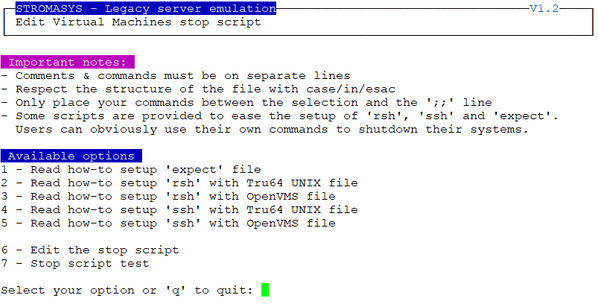
- Options 1 to 5 are explanations on how to setup and prepare the virtual machine and the Charon Linux server (if necessary) to use the three available methods.
- Option 6 edits the script. This script is in a form of "case in <configuration filename> do ..."
- Option 7 is used to test the script. Use with caution on production machines.
You'll find in options 1 to 5 all the details to setup the remote connection: packages to install, proxy settings for rsh, key pair definition for ssh (password and passphrase free), the necessary firewall settings if needed, etc...
Common stop script explanation
When the script is initialized using option 6 or when a new virtual machine is added, the following lines are added:
...
...
|
One of the blue colored lines above has to be uncommented depending on the method chosen. Other lines can remain in the script or can be deleted.
Notes:
- The values between the < and > signs have to be filled manually.
- The operating system must be set to either TRU64 or VMS (case insensitive).
- If the "rsh" or "ssh" method is used, the <hostname>, corresponding to the virtual machine hostname, must be known by the Charon Linux server.
Stop script content example:
 The editor defined in the Preferences is used to edit the script.
...
|
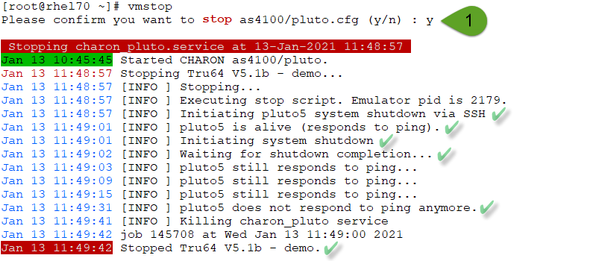
Stop script execution example with "ssh" on Red Hat Enterprise Linux 7.9:
Provided shutdown scripts explanation
Please note: whatever the shutdown script execution result is, the stop request sent by the systemctl command will stop the emulator. It is very important then to ensure the stop script has been tested and validated.
charon_gstop_expect
- Check if there's an active connection to the console on the local host, kill if any.
- Execute the /opt/charon/utils/guest_shutdown.exp expect script with the values provided: username (root), password, prompt, operating system (either TRU64 or VMS). This script is able to send the shutdown command depending on the returned characters on the console. This can be the SRM prompt ">>>", the "login:" or "username:" prompts or the prompt of the logged in user.
- Report all output to
/opt/charon/log/console.stop.<guest name>.log.
Notes:
- With Charon-AXP, the "
power off" command is sent at the SRM prompt - With Charon-VAX, the "
power off" command does not exist. To power off the virtual machine, the F6 key has to be enabled in the configuration file (set OPA0 stop_on="F6"). If not set, the emulator process is killed.  If the console is locked from an external connection or if the prompt is not detected after sending a carriage return, the expect script will fail.
charon_gstop_rsh
Check the guest can be reached via ping, if yes:
Issue the
shutdowncommand via "rsh" (depends on the operating system),Wait for a few seconds
Check if the guest can be "pinged" and repeat with an interval of 5 seconds
If the guest cannot be pinged, assume the shutdown procedure is complete
Use the
service killcommand. The shutdown commands does not power off nor stop the emulator process, that's why this operation is needed
Report the stop information within the guest log file
charon_gstop_ssh
Check the guest can be reached via ping, if yes:
Issue the
shutdowncommand via "ssh" (depends on the operating system),Wait for a few seconds
Check if the guest can be "pinged" and repeat with an interval of 5 seconds
If the guest cannot be pinged, assume the shutdown procedure is complete
Use the
service killcommand. The shutdown commands does not power off nor stop the emulator process, that's why this operation is neededReport the stop information within the guest log file
Forcing service status to INACTIVE without shutdown script
If a shutdown script is not defined, stopping the service will let it in a FAILED state. In case you perform the legacy OS shutdown manually and then stops the virtual machine, you can use the following method to force the service state to INACTIVE.
Example provided for uranus virtual machine (lines to add in blue color):
... /charon/uranus.cfg) PID=`ps -ef|grep "$2 -d $1"|grep -v grep|awk '{print $2}'` ... |
A clean shutdown of the legacy OS is highly recommended.
Related content
© Stromasys, 1999-2024 - All the information is provided on the best effort basis, and might be changed anytime without notice. Information provided does not mean Stromasys commitment to any features described.